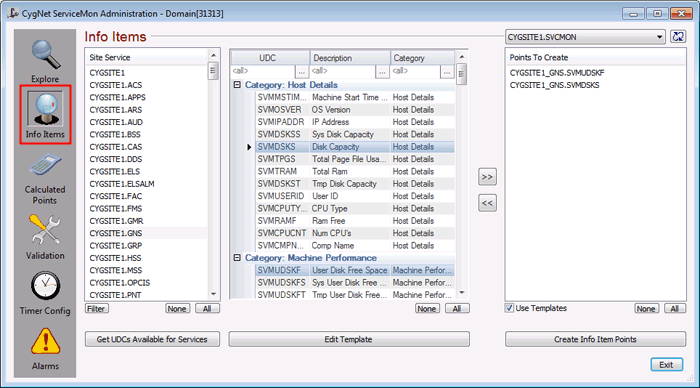
The Info Items view is used to create and edit SVCMON points that monitor system info items. The view consists of three separate windows.
To Create a SVCMON Point
To Edit a SVCMON Point
SVCMON points can be modified using a number of methods.
Using the CygNet ServiceMon Administration utility:
Using CygNet Explorer:
When creating points to monitor site ping time (SVMSTPT) and site status (SVMSTST), you must select a service since "sites" are not listed. However, the Facility property of the resulting points will be set to SITE.
The utility will only create points for which the service-UDC combination is valid. For example, if you show the UDCs for both MSS and VHS and try to create tags for the maximum VHS data file size (SVMVHSVFM) the utility will create only the point for the VHS since the UDC is not applicable to the MSS.
Once the SVCMON point is created, the Facility property of the point is the SITE_SERVICE and the UDC property is set to the SVCMON UDC (for example, MYSITE_RSM and SVMCTIMEL). Other properties are set by SVCMON. These include the General Data Field 1 (Site.Service being monitored) and General Data Field 2 (GENSERVE request) properties on the Application page, and the Point Reference properties (SVCMON timer) on the Point reference page. None of these properties should be changed.
Note that it is not necessary, nor desirable, to create SVCMON points for every possible service-UDC combination. For example, a host server generally has, at a minimum, a Remote Service Manager (RSM). As such, CygNet Software recommends that when creating SVCMON points to monitor server and network statistics that you base these points on the RSM. In other words, if you want a point to monitor the available disk space (SVMDSKS) on the host server, create the point just for the RSM. The same SVCMON applied to other services on the same server would be redundant.
The SVCMON UDCs are stored in the Table Reference Service in the ~UDCALL table. The CygNet ServiceMon Administration utility checks the table as part of its validation process and will add any missing UDCs.
Once a SVCMON point has been added and initialized, you can view the current value, status, state, and attributes by right-clicking on the point in the Explore view and clicking Properties.
You can also create SVCMON points that monitor system info items on other domains. See Cross Domain Support for more information.
More:
 Site or Service Names that Contain an Underscore

|
|
|

